
Sharing and Schedules
Save a useful report once. Share the settings, prepare recurring files or put the report on a dashboard.
Choose how to reuse a report
Section titled “Choose how to reuse a report”- Configure a report and choose Save as new.
- With that saved report selected, choose Share configuration.
- Copy the Share link and send it to your teammates.

Result: teammates open the same settings and run them using their own Jira access. Review saved JQL before sharing; it is part of the configuration.
Choose Stop sharing to disable existing links. Recipients can save a separate private copy.
Before you start: select a saved report and share its configuration.
- Open Schedule this report.
- Choose Weekly or Monthly, a day and local hour.
- Check the displayed timezone, then select Create schedule.
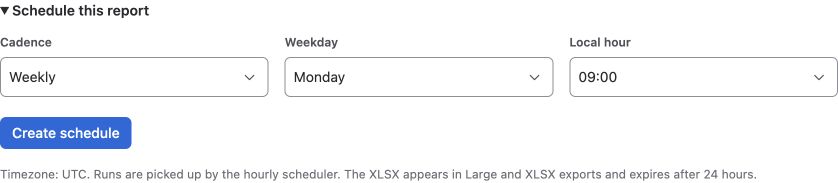
Result: next-run and last-run information appear here; the XLSX appears in Large and XLSX exports. Use Update schedule or Delete schedule to change or stop it.
Runs use the owner’s current Jira permissions and require an active app license. The hourly scheduler picks up due runs; exact-minute execution is not guaranteed. Download within 24 hours.
- On a Jira dashboard, choose Add gadget.
- Find and add Workflow Time report.
- Choose a saved report and select Save gadget.
Result: the gadget shows up to 25 issues using each viewer’s Jira access. Open the full report for larger selections.
Share the saved configuration if teammates need to use it on the dashboard. Sharing settings never grants additional Jira issue permissions.
Need a file instead? Continue to Exports.