Markdown Macro with LaTeX
Write Markdown and LaTeX in a Confluence macro, review the formatted result, and keep the source available for later editing.
Start here: Create your first Markdown macro. Write source, select Save and close, then publish or update the Confluence page.
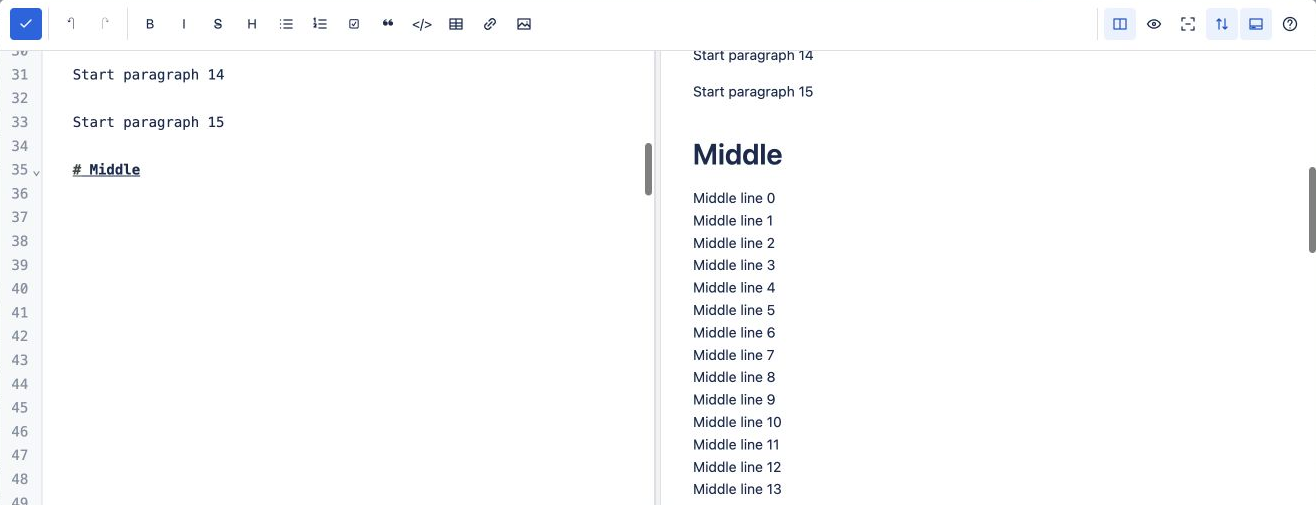
The Forge editor with source and formatted preview visible side by side. Select the image to open it at full size.
Choose your next task
Section titled “Choose your next task”| I want to… | Guide |
|---|---|
| Write or edit a macro, use preview, or recover unfinished editing | Write and edit Markdown |
| Check an existing Connect macro after a Forge update | Move from the Connect editor |
| Copy the source or check rendering and export limits | Compatibility and exports |
| Understand how Connect and Forge handle data | App privacy statement |
| Resolve a license, preview or save problem | Help and troubleshooting |
Where it fits
Section titled “Where it fits”Use the macro for engineering notes with formulas, Markdown tables alongside explanations, or source that you want to keep as Markdown instead of converting it into native Confluence blocks. The macro has its own source inside the page; normal Confluence permissions and the page’s publish/update workflow still apply.
A Confluence administrator installs the app from Atlassian Marketplace. An active evaluation or subscription is required. Page authors also need permission to edit and publish or update the destination page.