
Exports
Download the result on screen, or prepare all matching issues in the background. Exports recalculate the report, so open durations and Jira search membership can differ from the result currently displayed.
Choose an export
Section titled “Choose an export”- Run the report and check its scope and completeness.
- Choose the CSV action for your result:
| Result | Action |
|---|---|
| Issue rows | Export this page as CSV |
| Grouped values | Export aggregate CSV |
| Issues behind groups | Export contributing issues CSV |
- When preparation finishes, select Download CSV and save the file.
Result: a CSV for the displayed report scope.
- Run the report, then expand Large and XLSX exports.
- Choose Export all as CSV or Export all as XLSX.
- Follow the page/issue progress until the job is ready.
- Choose Prepare download → Download.
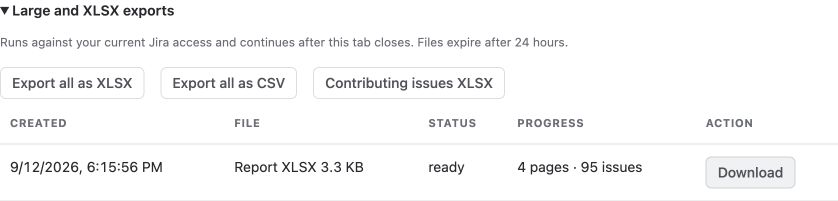
Contributing issues XLSX is also available for grouped reports. You can close the tab while a background job runs and return later to download it.
Understand background status
Section titled “Understand background status”| Status | Meaning and action |
|---|---|
| queued | The request is waiting for a worker. Recovery can redispatch recoverable queued work. |
| running | Jira pages are being collected. Progress shows processed pages and issues. |
| ready | The file is available. Choose Prepare download, then Download. |
| failed | The job stopped after a permission, configuration or processing error. Read the message, correct the cause and start a new export. |
| cancelled | You cancelled a queued or running job. Start a new export if needed. |
| expired | The 24-hour file window ended. Start a new export. |
Use Cancel to stop a queued or running job. Recoverable transient failures can be retried by the background worker; a permission failure does not fall back to another Jira user or app-wide access.
Check completeness and limits
Missing values are not zero. Resolve issue errors before using a partial total. Background exports collect up to 20,000 issues; interactive all-pages reports collect up to 5,000. Page and data-size limits may stop collection sooner. Narrow the selection and retry if needed.
Read the filters, calendar, period and completeness in the file. Jira can change while pages are collected; an all-issues export is not an atomic database snapshot.
Sharing a configuration does not share its owner’s export files. Review downloaded data before distributing it. For repeated failures, see Troubleshooting and Support.