Variables and Smart Values
Variables and Smart Values let one template adapt to each run without turning it into an unrestricted script.
- A variable is a question defined by the template author. The user answers
it before previewing the run, for example
{{version}}or{{customer}}. - A Smart Value is a value supplied by the app from the run time or Jira
context, for example
{{today+7d}}or{{project.key}}.
This is a bounded Issue Templates syntax. It is not the Jira Automation Smart Values language and does not evaluate arbitrary expressions, functions, or scripts.
Start with a complete example
Section titled “Start with a complete example”Suppose a release template contains:
Root summary: Release {{version}} for {{project.key}}Due date: {{today+7d}}Child summary: Prepare release notes for {{version}}The author defines a required text variable named version. At run time the
user enters 3.2.0. If the recorded run date is 3 September 2026 and the
destination project is PAY, the preview can show:
Root summary: Release 3.2.0 for PAYDue date: 2026-09-10Child summary: Prepare release notes for 3.2.0The exact date is calculated from the single recorded run time. Always review the resolved preview before selecting the final Create or Apply action.
Define a variable
Section titled “Define a variable”- Open Apps → Issue Templates & Hierarchy Builder.
- Create a template, or select Details → Edit template on an existing template.
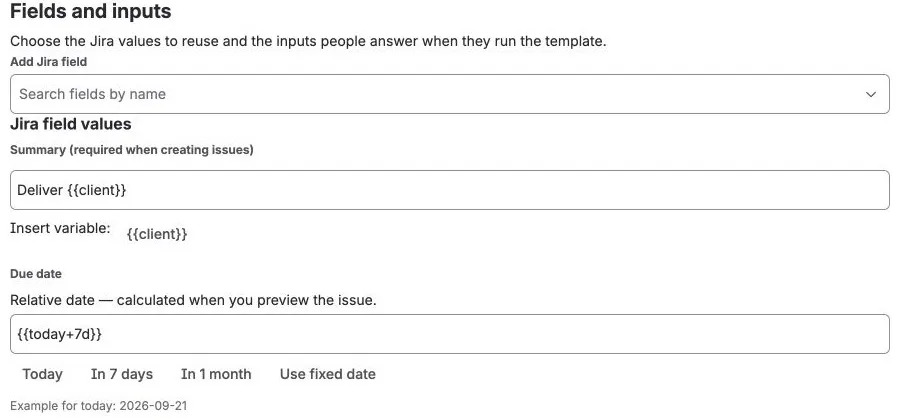
- Open Fields & inputs. Under Variables, select Add variable.
- Enter a unique name, choose a type, and optionally add a default.
- Enable Required when every run must supply a value.
- Insert the generated
{{name}}token into a supported root or child value. - Save the template, enter a test value, and use Preview before creating Jira work.
Variable types
Section titled “Variable types”| Type | What the user enters | Good use |
|---|---|---|
| Text | A short text value | Version, customer, environment, or readable owner name |
| Select | One option defined by the author | Tier, region, release channel, or process variant |
| User | A Jira user selected with Jira’s picker | Assignee, Reporter, or a user-picker custom field |
| Date | A date in Jira’s date control | Start date, Due date, or a date custom field |
Select variables require at least one option. Date variables use YYYY-MM-DD
internally. User variables store an Atlassian account ID and are intended for
user fields; use a separate text variable when a person’s readable name must
appear in a Summary or Description.
Variable names must start with a letter or underscore. The remaining characters can be letters, numbers, dots, dashes, or underscores. Names are case-sensitive and must be unique within the template.
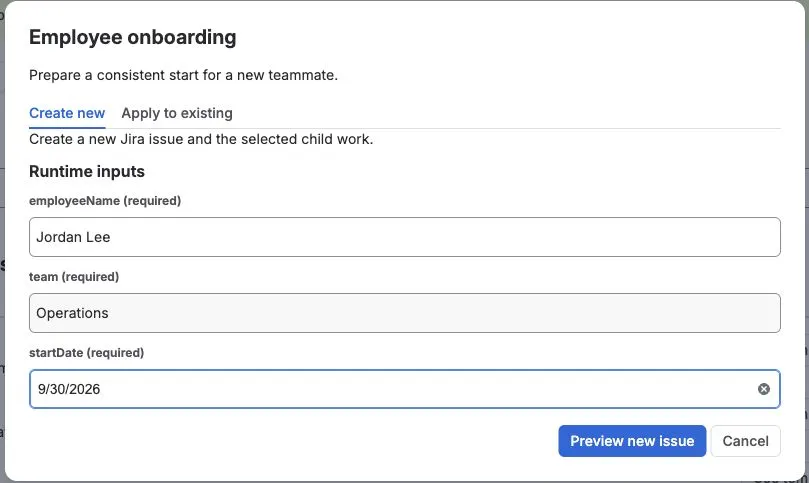
For example, the Employee onboarding template asks for an employee name, team, and start date before Preview. This pictured fixture creates a root issue; it does not show the larger onboarding hierarchy described in the use case.
Where tokens can be used
Section titled “Where tokens can be used”The supported authoring paths are:
- Text, paragraph, and common system values on the root issue.
- Equivalent supported values on child issues.
- Jira date fields through the Today, In 7 days, and In 1 month shortcuts, or another supported date token entered directly.
- Canned-comment text.
Optional native Jira Create prefill is different: it snapshots literal values and variable defaults when an administrator saves the rule. It does not ask run variables or calculate fresh context and relative dates each time Jira’s Create dialog opens. See Native Jira Create Prefill.
The editor shows an Insert variable action beside compatible text values. For a typed Jira field such as Select, Group, Sprint, or User, prefer that field’s Jira-aware control instead of placing a token into an option ID.
Built-in Smart Value reference
Section titled “Built-in Smart Value reference”| Token | Resolved value | Important availability note |
|---|---|---|
{{today}} |
Run date as YYYY-MM-DD |
Available wherever tokens are resolved |
{{now}} |
Recorded run time as an ISO timestamp | Available wherever tokens are resolved |
{{project.key}} |
Destination project key | Available after the destination context is known |
{{issue.key}} |
Current issue key | Available for an existing-issue flow; a new root has no key before creation |
{{source.key}} |
Source issue key, or current issue key when applicable | Requires an existing source/current issue |
{{root.key}} |
Root issue key | Known for Apply and during child execution; not known in a new root field |
{{parent.key}} |
Created parent issue key | Available during child execution after the parent exists; not available in the initial preview |
{{issue.summary}} |
Current issue Summary | Requires a loaded existing issue context |
{{issue.type}} |
Jira issue-type identifier | This is an identifier, not the issue-type display name |
{{currentUser.accountId}} |
Signed-in Atlassian account ID | Use a User variable and Jira user field for normal authoring |
{{currentUser.displayName}} |
Signed-in user’s display name | Currently safe only for explicit Create root values and its root comments; do not rely on it in Apply or child values |
Context values exist only when the selected workflow knows them. For example,
{{parent.key}} cannot be shown before the parent issue has been created. If a
readable value must be identical across Create, Apply, preview, and child work,
collect it as a required text variable instead of depending on a late Jira
context.
Relative date and time syntax
Section titled “Relative date and time syntax”Use today for a date or now for a timestamp, followed by an optional plus or
minus offset:
{{today+7d}}{{today-2w}}{{today+1m}}{{now+4h}}{{now-1d}}| Unit | Meaning |
|---|---|
h |
Hours |
d |
Days |
w |
Weeks |
m |
Months |
y |
Years |
The amount must be a positive whole number; the sign controls the direction. Resolution uses one UTC run timestamp so the root and children do not drift if processing crosses midnight. Review month-end and year-end dates in Preview.
Resolution and validation rules
Section titled “Resolution and validation rules”- A missing required variable blocks Preview and mutation.
- An invalid date or Select answer produces an inline error.
- User answers come from Jira’s picker; users do not type account IDs.
- Custom variables take precedence over built-in Smart Values. Avoid defining
variables named
today,now,project.key, or any other built-in token. - An unknown token, a misspelled token, or a token whose context is unavailable resolves to an empty string. The app does not execute it as code.
- The initial preview is the safety boundary: verify every resolved field and selected child before confirming the operation.
If a result is blank or unexpected, first check the token spelling and the workflow context. See Troubleshooting and Support when the preview and final Jira result do not agree.