Explore Use Cases
Use the app when your team creates almost the same Jira work repeatedly, but a few values change each time.
Find a familiar situation
Section titled “Find a familiar situation”Enter a changing value → review the proposed work → create it. For example, the installed Release readiness starter resolves one version into a root issue and three selected subtasks before Jira is changed.
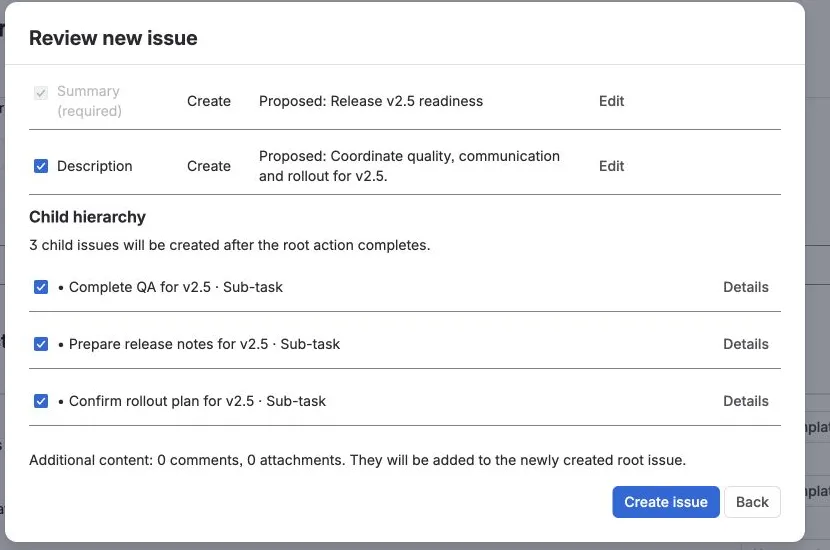
Follow the complete first-run flow →
The scenarios below use the same product pattern with different templates and entry points.
| Situation | Use | Result |
|---|---|---|
| Every release needs the same readiness work | Release readiness | One release issue + repeatable child checklist |
| Every new employee needs coordinated setup | Employee onboarding | One onboarding issue + IT/access/setup work |
| Every customer rollout follows similar steps | Customer onboarding | One delivery plan with customer-specific values |
| Every incident needs the same follow-up | Incident follow-up | Apply standard follow-up to the existing incident |
| A JSM request needs predictable fulfillment work | JSM request fulfillment | Customer request + internal follow-up hierarchy |
The reusable pattern
Section titled “The reusable pattern”Keep the process. Change the inputs. Choose how it starts.
- Keep: fields, child work, hierarchy, links.
- Change: customer, employee, version, date, owner, environment.
- Start with: Create, Apply, JSM portal, or Workflow Create.
More ideas
Section titled “More ideas”Deployment checklists · access reviews · vendor onboarding · campaign launches · monthly operations · QA regression packs · audit readiness · support escalations · site-opening checklists.
If your team says “we create almost the same Jira issues every time”, the pattern probably fits.