Templates and Supported Fields
A template describes one root issue and optional child work. Each work item can have a Jira parent, an additional issue link, both, or neither when Jira allows that structure. The template also records the Jira context, variables, availability rules, overwrite policy, and revision used for support and provenance.
Create a template from scratch
Section titled “Create a template from scratch”- Open the template library and select Create template.
- In Basics, give the template a clear name, description, category, project, and work type.
- In Fields & inputs, add only the Jira values the template should own and define any runtime inputs.
- In Structure, add child work and configure each item’s work type, parent, optional issue link, and Jira values.
- In Review & settings, confirm the outcome, overwrite rule, availability, and optional integrations.
- Select Save template.
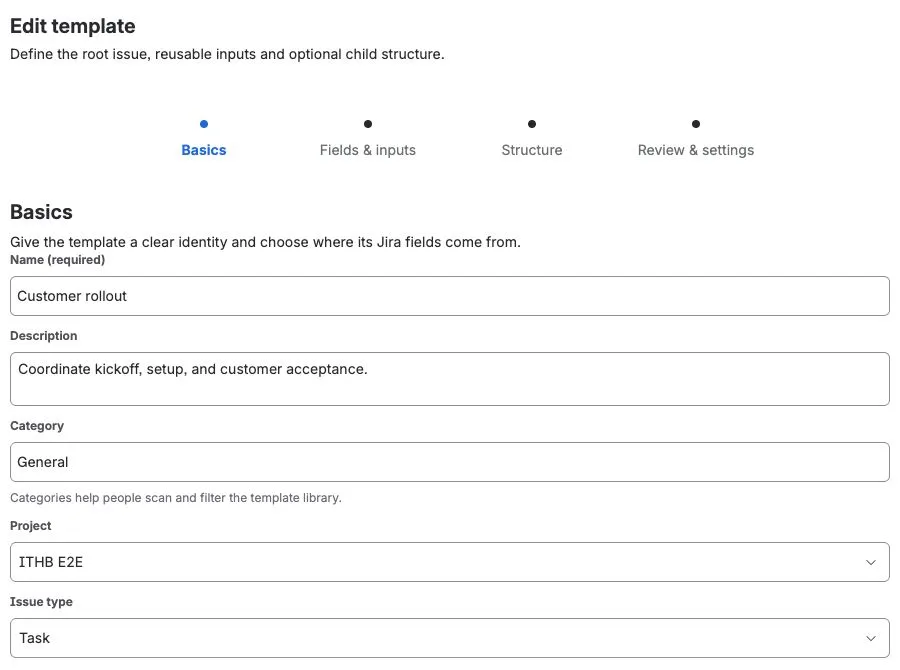
The app stores stable Jira field IDs and compact schema information. Field names remain readable labels and can change without becoming the field’s identity.
Build the work structure
Section titled “Build the work structure”Open Structure in the template editor, add a work item, and choose its work type. Configure its two relationships separately:
- Parent controls Jira hierarchy. Choose the root issue, a compatible work item in the template, or Standalone — no Jira parent when that work type can exist without a parent.
- Relationship optionally adds a Jira issue link. Choose the link type and direction shown by the editor, or keep Hierarchy only.
The parent list follows the hierarchy levels configured by Jira. It excludes self, descendants, same-level work and other incompatible choices that would produce an invalid Jira hierarchy. A compatible work item added later in the template can still be selected as the parent.
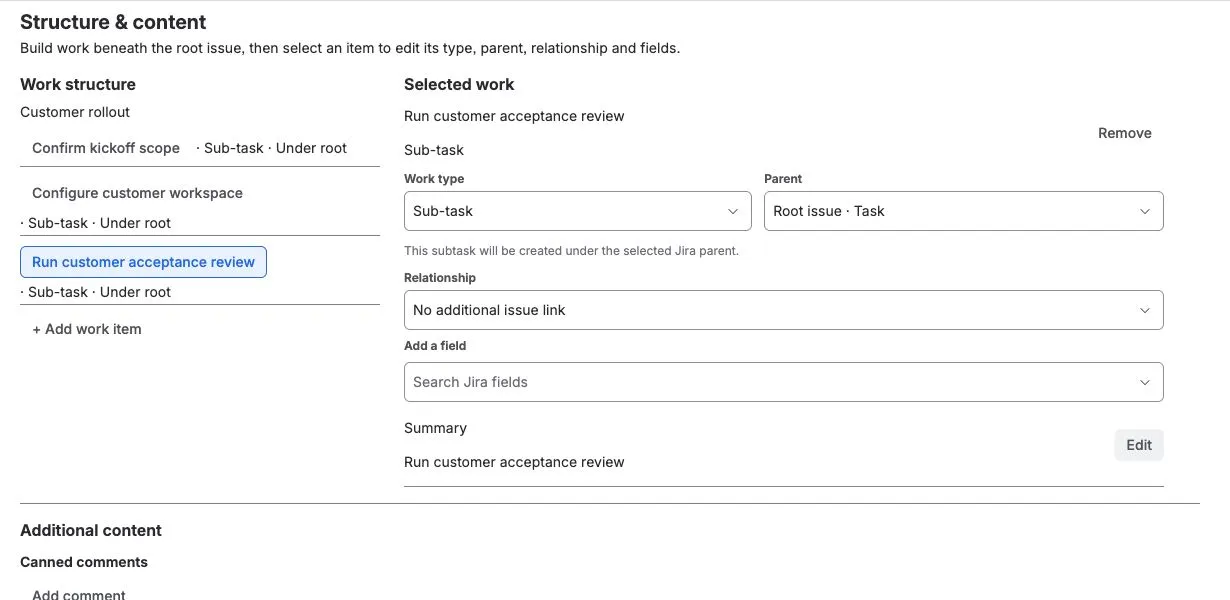
Review the visible tree after changing a work type or parent. If the new work type makes an existing parent invalid, the app clears that choice instead of guessing a replacement.
A template can contain up to 20 child work items. This is also the maximum number of related work items inspected by a single Capture or Recreate operation.
Add reusable and dynamic values
Section titled “Add reusable and dynamic values”Use the Insert variable controls beside compatible root and child text
values to add tokens such as {{version}}. Date fields also provide shortcuts
for Today, In 7 days, and In 1 month.
Typed Jira fields should normally keep their typed editor. For example, choose a user with Jira’s User picker and choose a Sprint from the discovered Sprint options. Do not place a text token into a Jira option ID unless that exact path has been verified in Preview.
Read Variables and Smart Values before using
context tokens such as {{issue.key}} or {{parent.key}}; some Jira values do
not exist until a particular operation or child creation step.
Capture an existing issue
Section titled “Capture an existing issue”Use Create from issue in the library, or Create template from issue from an issue’s actions menu, when live Jira work already represents the process you want to reuse.
The capture preview lists supported root fields, nested child work, and links to the captured root. Select Preview capture, choose the fields and related work to keep, and then select Save template. If the same issue is both below the root and linked to it, the app keeps one work item with both relationships instead of duplicating it. Unsupported fields are reported and omitted rather than copied with a guessed payload.
Supported Jira-native fields
Section titled “Supported Jira-native fields”The documented product paths support:
- Short text and paragraph fields.
- URL and number fields.
- Date and date-time fields.
- Single select, multi-select, cascading select, and checkbox fields.
- Single-user and multi-user pickers.
- Group and multi-group pickers.
- Sprint fields on supported Jira Software contexts.
- Common system fields such as Summary, Description, Assignee, Reporter, Priority, Labels, Components, Fix versions, Due date, and Environment when Jira exposes them as writable in the selected context.
For Sprint, the app discovers active and future Sprints from visible Scrum boards. Jira rejects a direct Sprint assignment to a subtask, so subtasks inherit Sprint membership from their parent instead.
Context changes
Section titled “Context changes”A field can be removed, renamed, or leave the target project/issue-type context. Before writing, the app reloads the live Jira metadata. An unavailable field is warned and skipped; it does not silently invalidate the whole hierarchy.
When Apply or Recreate targets another project, a valid selected Jira work-type
ID remains the first choice. Otherwise, the app looks for a compatible named
work type or the project’s sole compatible subtask type, then validates the
hierarchy before changing Jira. If several subtask types match only a generic
Subtask choice, select the intended type in Structure; the app will not
guess. Preview identifies any work item that the destination cannot represent.
See Known limitations for Rank, Assets, third-party fields, and native Create-specific boundaries.