Native Jira Create Prefill
Native Create prefill is an optional convenience for teams that want selected template values in Jira’s standard Create dialog. It is not required for the app’s explicit Create and Apply workflows.
Native Create does not show the app’s run-variable form or resolve a fresh Jira context for every dialog. When an administrator saves the rule, the app snapshots literal template values and available variable defaults into the UI Modification. Use explicit Create when users must answer variables or when a date/context value must be calculated for each run.
How a rule works
Section titled “How a rule works”An administrator enables prefill for one exact combination of:
- Jira project.
- Issue type.
- Global Issue Create context.
The app then fills supported fields only when both project and issue type match. Changing context causes app-owned values to be reevaluated.
Enable a rule
Section titled “Enable a rule”- Open a template and select Edit template.
- Continue to Review & settings and expand the settings.
- Enable Use as the app default for this project and issue type.
- Enable Also prefill Jira’s native Create dialog.
- Select Save template.
- Open Jira’s standard Create dialog and test the exact project and work type before rolling the rule out.
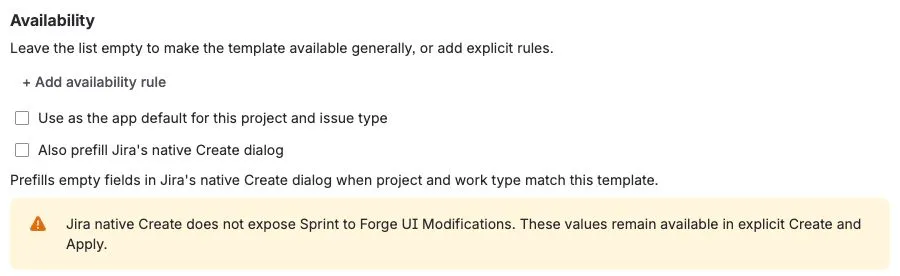
The screenshot shows the controls before enabling them. The Sprint warning appears because that field is available in explicit Create and Apply, but Jira does not expose it to this native Create integration.
User-value protection
Section titled “User-value protection”The rule follows two safety principles:
- Fill an empty field only.
- Clear a value on context change only while that value is still owned by the app.
If a user edits the prefilled value, the app treats it as user-owned and does not remove it during a later context change.
Supported fields in native Create
Section titled “Supported fields in native Create”Forge UI Modifications exposes a smaller field set than the app’s explicit workflows. The verified native path supports common system fields plus the app’s URL and cascading-select handling where Jira exposes them.
Group picker and Sprint are not exposed to this Forge integration, so this app does not prefill those fields through native Create. They remain available in explicit Create and Apply.
Variables and Smart Values
Section titled “Variables and Smart Values”- Every required template variable needs a valid default before the native rule can be saved.
- Native Create cannot ask the user for a template variable. It uses the default that was snapshotted when the administrator saved the rule.
- Do not use
{{today}},{{now}}, or relative-date tokens for a date that should move with each dialog opening. The saved rule contains the value resolved at configuration time. - Issue, root, parent, and current-user context tokens are not a dependable native-prefill path. Use explicit Create and confirm the resolved preview instead.
Platform boundary
Section titled “Platform boundary”Jira currently allows up to five UI Modifications apps to apply changes in the same project, issue-type, and view context. They run asynchronously, and apps that modify the same field can conflict; when more than five are configured, some app changes are ignored.
Atlassian may also change which fields a Jira Create surface exposes. Keep explicit Create as the dependable cross-context path and verify a new rule in its exact project and issue type before announcing it to users.